Clone a Course
Applies to: Lite & Pro
Clone a Course
For: Teachers & Administrators
Make a full copy of an existing course — including its lessons and quizzes — so you can reuse its structure as a starting point for a new course. Cloning is the safe way to experiment: the copy is independent, so changes to it never affect the original.
Cloning duplicates the course, its modules, and its settings into a new course named after the original with “ (Copy)” added. Because the copy is separate, you can delete or reshape it without touching the source. This is also the recommended first step before removing any course, so you always keep a backup.
Before you start
- You are logged in as a Teacher or Administrator.
- The course you want to copy already exists. (New courses are created from Add a Course.)
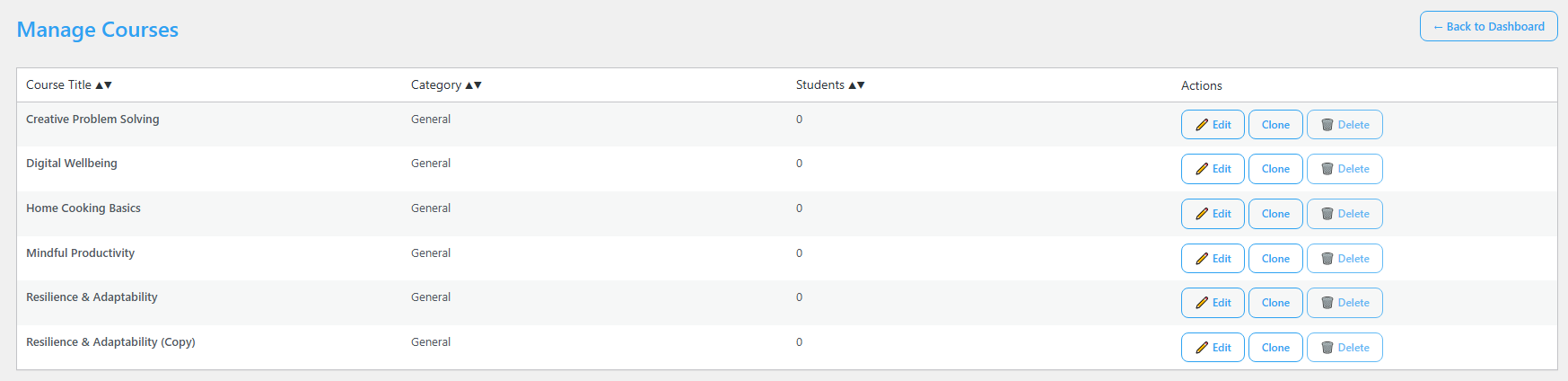
- You are on the Manage Courses screen. From the Voltora Academy menu in your WordPress dashboard, choose Manage Courses.
Clone a course
- In the course list, find the course you want to duplicate.
- Click Clone in that course’s Actions column.
- A new course appears in the list named after the original with “ (Copy)” added (for example, “Resilience & Adaptability (Copy)”).
- Open the copy with Edit to rename it and adjust its lessons, quizzes, and settings.
Tips & things to know
- Cloning copies the structure and content, not the enrolled students — the new course starts with no students.
- Before deleting any course, clone it first so you keep a backup you can restore.
- The clone is fully independent: editing or deleting the copy never changes the original course.
- When you clone a course to offer it again, the clone must use a different URL slug than the original. Voltora Academy creates a unique slug automatically, but if you set one yourself, make sure it does not match another course.
- A cloned course appears on the main dashboard in the Drafts tab until you publish it.
Pro Feature
Cloning works the same way in Voltora Academy Pro. Pro adds the ability to sell the cloned course as a WooCommerce product and to load demo courses you can clone as templates.
Related articles
- Add a Course
- Edit a Course
- Manage Courses