Pro: Gamification (Mastery & Streaks)
Applies to: Pro
Pro: Gamification (Mastery & Streaks)
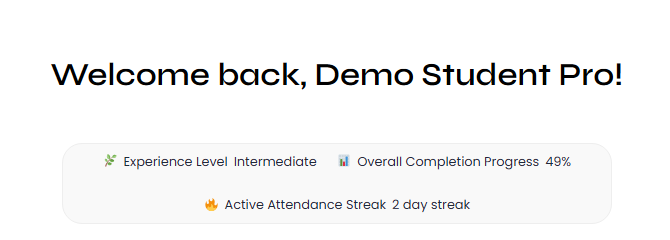
Voltora Academy Pro turns steady learning into visible momentum. Your Student Portal shows an Experience Level, an Overall Completion Progress percentage, and an Active Attendance Streak — light, encouraging signals of how consistently you are studying.
This article explains each gamification stat and where to find it. (Your private Course Notes/Journal is a separate feature — see Pro: Student Course Notes/Journal.)
Before you start
- You are logged in as a student on a Voltora Academy Pro site.
Steps — find your gamification stats
- Open My Account (or your Student Portal).
- Below the Welcome back greeting, read the three-icon stats bar:
- Experience Level — a mastery tier such as Novice or Intermediate.
- Overall Completion Progress — your combined progress across all courses (for example, 59%).
- Active Attendance Streak — consecutive days of activity (for example, 0 day streak when not yet built up).
- Use the Current Courses list and the Completed / Accomplishments sections to see which courses feed those numbers.
Tips & things to know
- Progress is calculated automatically as you complete lessons and pass quizzes — no manual step.
- The attendance streak reflects return visits; opening and working in your courses keeps it alive.
- These stats are adult gamification (mastery + streak) and are distinct from your private journal.
- Gamification stats are a Pro-only feature and do not appear on Lite accounts.
Related articles
- Student: View Your Course Progress
- Pro: Certificates of Completion
- Pro: Student Course Notes/Journal