Pro: Bookmarks & Threaded Discussions
Applies to: Pro
Pro: Bookmarks & Threaded Discussions
Voltora Academy Pro helps you stay organized and connected while you learn. You can bookmark a lesson to return to it quickly, and take part in threaded discussions on lessons with replies from your instructor.
This article covers both features from the student view.

Before you start
- You are logged in as a student on a Voltora Academy Pro site.
- You are enrolled in at least one course.
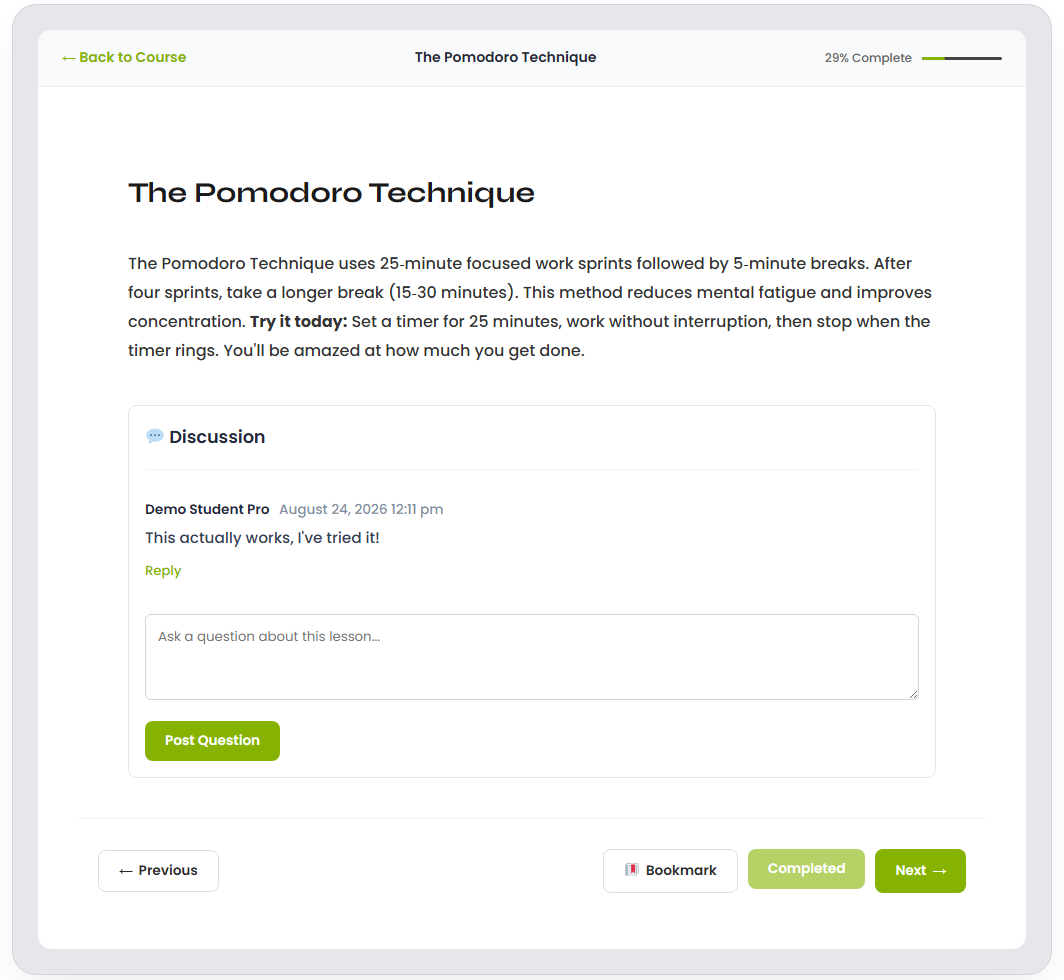
Steps — bookmark a lesson
- Navigate to a lesson module.
- Press the Bookmark button at the bottom of any lesson. A bookmarked lesson shows a pushpin icon beside the course name (for example, The Flavor Foundation: Homemade Stocks and Aromatics under Home Cooking Basics) on the sidebar of the Student or Teacher Portal.
Steps — remove a bookmark
- Follow the bookmark from your Student or Teacher Portal.
- Press the bookmark button to remove it.
Steps — join a threaded discussion
- Open a course and go to a lesson module.
- To reply to an existing question or comment, click Reply. To post a new comment or question, type in the main text area and click the Post Question button.
- Instructor replies arrive as notifications, so you are notified when your teacher responds.
Tips & things to know
- Bookmarks are a personal shortcut — they help you jump back to a saved lesson module.
- Threaded discussions let you ask questions in context; instructor reply notifications keep the conversation going.
- Both features are Pro-only. Lite students do not have bookmarks or lesson discussions.