SpotEdit: Approve or Discard a Change (Managers)
Applies to: PowerTools Suite & Agency Admin Deck
SpotEdit lets your staff change specific text, links, and images on the live Divi 5 page without ever opening the Visual Builder. When a spot needs approval, the live page stays the same until a SpotEdit Manager or Administrator publishes the change from the Staff desk.
Step-by-step
- Log in and click Staff desk in the WordPress admin bar at the top left.
- Review Waiting for approval. The table shows the page, spot name, proposed change, who sent it, and when.
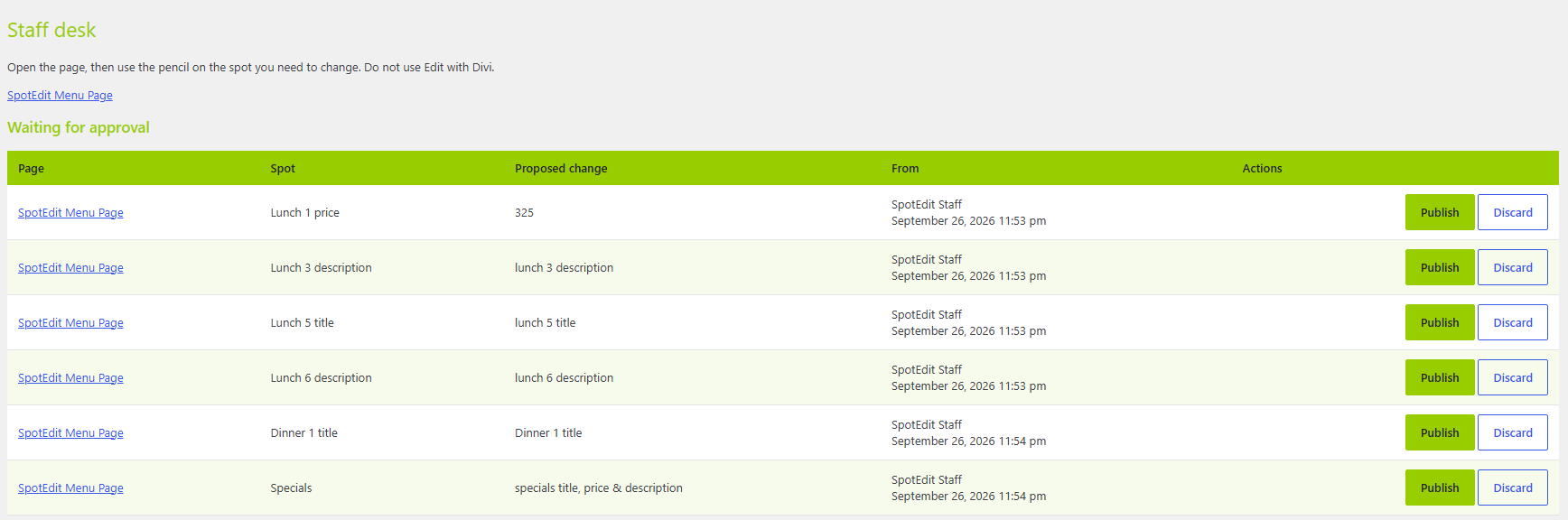
- Click Publish to put the change on the live page, or Discard to throw it away.